Custom Hermes STT Plugin: Amazon Transcribe
10 July 2026
I run Hermes Agent on an EC2 instance, firstly, because I know it well, and secondly, because I get a lot of AWS Community Builder credits. Although I use OpenRouter as the model provider (as Bedrock's offering is quite limited), there are other services that can be used to complete the agent's harness for abilities such as speech-to-text, text-to-speech, OCR and others. It turns out, building custom plugins for Hermes is surprisingly easy! So today, we are going to build one for speech-to-text to utilize Amazon Transcribe (which I also refer to as AWS Transcribe). I will follow this guide from Hermes docs to build it.
Repository with full code is here
The infra basics
Before we start any code, I want to set up the infrastructure part. First, we
need an S3 bucket where we are going to upload the audio files. I will also set
an expiration policy on the prefix transcribe-inputs so that in case the
cleanup routine doesn't run, the bucket will not fill up with random audio
files.
resource "random_string" "bucket_suffix" {
  length  = 8
  special = false
  upper   = false
}

resource "aws_s3_bucket" "bucket" {
  bucket = "hermes-bucket-${random_string.bucket_suffix.result}"
}

resource "aws_s3_bucket_lifecycle_configuration" "lifecycle" {
  bucket = aws_s3_bucket.bucket.id

  rule {
    id     = "delete-transcribe-inputs-after-1-day"
    status = "Enabled"
    filter { prefix = "transcribe-inputs" }
    expiration { days = 1 }
  }
}
Next thing is to set up the required permissions for the agent. I will use the following IAM Policy document that can help you create the actual policy for the role or user of your choice. I am using Hermes on EC2 so I will attach this policy to a role with instance profile. These are the minimal permission that will allow to upload the audio files, process them and clean up afterwards.
data "aws_iam_policy_document" "transcribe_policy" {
  statement {
    sid    = "AllowTranscribeJobs"
    effect = "Allow"
    actions = [
      "transcribe:GetTranscriptionJob",
      "transcribe:DeleteTranscriptionJob",
      "transcribe:StartTranscriptionJob",
      "transcribe:ListTranscriptionJobs",
    ]
    resources = ["*"]
  }

  statement {
    sid = "AllowReadWriteTranscribeInputs"
    effect = "Allow"
    actions = [
      "s3:GetObject",
      "s3:PutObject",
      "s3:DeleteObject"
    ]
    resources = ["${aws_s3_bucket.bucket.arn}/transcribe-inputs/*"]
  }
}

resource "aws_iam_role_policy" "transcribe_policy" {
  name   = "HermesAgentTranscribePolicy"
  role   = aws_iam_role.hermes.id
  policy = data.aws_iam_policy_document.transcribe_policy.json
}
The plugin basics
Based on the docs I mentioned earlier we can define the basic draft of our
plugin. Create a new directory: ~/.hermes/plugins/aws-transcribe or wherever
you have it installed. In there you need at least two files plugin.yaml and
__init__.py, so create both. plugin.yaml is just a metadata file that will
keep name, version.
name: aws-transcribe
version: 0.1.0
description: "AWS Transcribe STT backend"
For the actual code, we need to define a new class that will override required functions. Before we start it, let's define how the overarching pipeline will look like. First we will receive a local file path. This we need to upload to S3 and call Amazon Transcribe to start transcription job and, as the job is async, we need to wait for it to finish. Afterwards, we fetch transcribed text and delete S3 object and the Transcribe job. (Theoretically a streaming transcription is also possible and is faster but unavailable in boto3. You can alternatively try JavaScript or Go.)
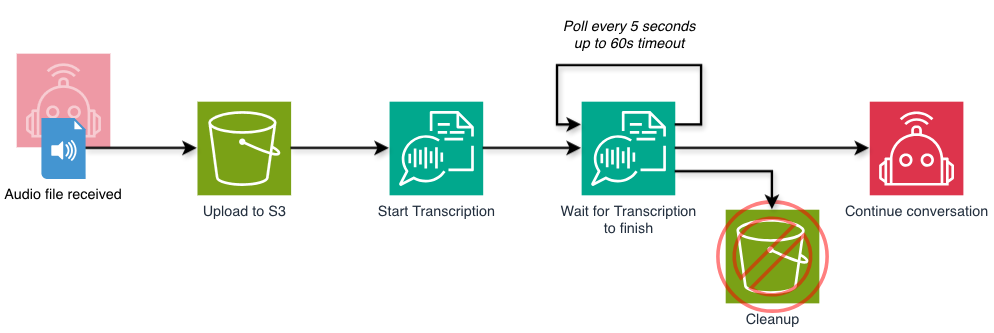
As we have some idea what to do now, we can write a skeleton of the new plugin.
Functions referenced in transcribe are not yet existing.
from __future__ import annotations
from agent.transcription_provider import TranscriptionProvider
from typing import Any, Dict
import logging
import boto3
import os

logger = logging.getLogger(__name__)

class AWSTranscribeError(Exception):
    pass

class AWSTranscribeProvider(TranscriptionProvider):
    @property
    def name(self) -> str:
        return "aws-transcribe"

    @property
    def display_name(self) -> str:
        return "AWS Transcribe"

    def is_available(self) -> bool:
        # Perform test if we have any AWS connectivity and a bucket is set
        try:
            boto3.client("sts").get_caller_identity()
            return bool(os.environ.get("AWS_TRANSCRIBE_BUCKET"))
        except Exception as exc:
            return False

    def transcribe(self, file_path, *, model=None, language=None, **extra):

        try:
            s3_uri = self._upload_to_s3(file_path)
            job_name = self._start_transcription_job(s3_uri, language or "auto")
            job = self._wait_for_job(job_name)
            text = self._get_transcript(job)
            self._try_cleanup(s3_uri, job_name)

            return {
                "success": True,
                "transcript": text,
                "provider": "aws-transcribe",
            }

        except Exception as exc:
            logger.error(f"{exc}")
            return {
                "success": False,
                "transcript": "",
                "error": f"aws-transcribe failed: {exc}",
                "provider": "aws-transcribe",
            }


def register(ctx):
    ctx.register_transcription_provider(AWSTranscribeProvider())
Let's dissect it step by step. At the top, we import libraries needed for now
and create a new logger that will inform us if something fails. Errors will be
visible in Hermes' Gateway logs (for example
journalctl -xe --user -u hermes-gateway if you use systemd installation). The
first two methods in the class are just informative. is_available is sort of
a health check - is everything we need configured to run the plugin? I check
first if there's any IAM role or user configured that can call AWS and whether
the staging bucket is defined in environment variable AWS_TRANSCRIBE_BUCKET
(this should be set in ~/.hermes/.env). The method transcribe is called by
Hermes when there's a file sent by the user and is_available passes. It
expects to return the dict you see there near returns. In the try-catch block
we simply call pipeline methods one after another, catching and logging any
errors in case they happen. The last method register is done outside the
class and is just a loader function for Hermes plugin manager.
Parts of the pipeline
Now we can start defining all the nested functions. First we upload the file to S3 bucket. To make it unique and safe to pass to Transcribe, we will use an UUID as the object key.
import uuid
# ...

class AWSTranscribeProvider(TranscriptionProvider):
    # ...
    def _upload_to_s3(self, local_file_path: str) -> str | None:
        """
        Upload a local file to S3 and return the S3 URI.
        """
        ext = os.path.splitext(local_file_path)[1]
        s3_key = f"transcribe-inputs/{uuid.uuid4().hex}{ext}"
        client = boto3.client("s3")
        client.upload_file(local_file_path, os.environ.get("AWS_TRANSCRIBE_BUCKET"), s3_key)
        return f"s3://{os.environ.get('AWS_TRANSCRIBE_BUCKET')}/{s3_key}"
With the S3 URI that we receive, we can continue by starting the transcription job. There's an option to configure language for STT in Hermes but I decided to support also "auto" which will let Transcribe identify the language by itself. For safety and uniqueness I also use UUID to name the job and need return it to store for later.
class AWSTranscribeProvider(TranscriptionProvider):
    # ...
    def _start_transcription_job(self, s3_uri: str, language: str) -> str | None:
        """
        Start a transcription job and return the job name.
        """
        job_name = f"hermes-{uuid.uuid4()}"
        client = boto3.client("transcribe")
        if language == "auto":
            client.start_transcription_job(
                TranscriptionJobName=job_name,
                Media={"MediaFileUri": s3_uri},
                IdentifyLanguage=True
            )
        else:
            client.start_transcription_job(
                TranscriptionJobName=job_name,
                Media={"MediaFileUri": s3_uri},
                LanguageCode=language
            )
        return job_name
Next up we have to wait for the job to finish. I will poll the API every 5 seconds up to 60 as waiting anything longer can be either bad user (me 😅) experience or that something larger went wrong. I can simply use other service like iOS built-in or Wispr Flow after that time. This method will respond with a dict containing a presigned S3 URI (in AWS'es own S3 bucket) in case the job is successful.
import time
# ...
class AWSTranscribeProvider(TranscriptionProvider):
    # ...
    def _wait_for_job(self, job_name: str, timeout: float = 60.0, poll_interval: float = 5.0) -> str | None:
        """
        Wait for a transcription job to complete and return the transcript.
        """
        client = boto3.client("transcribe")
        deadline = time.monotonic() + timeout

        while True:
            response = client.get_transcription_job(TranscriptionJobName=job_name)
            job = response["TranscriptionJob"]
            status = job["TranscriptionJobStatus"]

            if status == "COMPLETED":
                return job

            if status == "FAILED":
                raise AWSTranscribeError(f"Transcription job failed: {job.get('FailureReason', 'No failure reason was returned by AWS.')}")

            remaining = deadline - time.monotonic()
            if remaining <= 0:
                raise AWSTranscribeError(f"Timed out waiting for transcription job {job_name} after {timeout:.1f} seconds.")
            time.sleep(min(poll_interval, remaining))
In next step we need to use received presigned URL to download a JSON file that will contain all the information about the transcription job such as language detected and most importantly the actual transcribed text.
import json
from urllib.request import urlopen
# ...
class AWSTranscribeProvider(TranscriptionProvider):
    # ...
    def _get_transcript(self, job: Any) -> str:
        with urlopen(job["Transcript"]["TranscriptFileUri"]) as response:
            transcript_json = json.load(response)
            transcripts = transcript_json.get("results", {}).get("transcripts", [])
            if not transcripts:
                return ""
            return transcripts[0].get("transcript", "")
And the last function that is a good idea and you can implement optionally is cleanup. That way Transcribe won't hold all the text you speak and S3 will not be bloated with unnecessary audio files. In case this fails, we will only log a warning and the transcription itself will be successful.
class AWSTranscribeProvider(TranscriptionProvider):
    # ...
    def _try_cleanup(self, s3_uri: str, job_name: str) -> None:
        """
        Try to clean up the temporary files and job.
        """
        try:
            client = boto3.client("s3")
            client.delete_object(Bucket=os.environ.get("AWS_TRANSCRIBE_BUCKET"), Key=s3_uri.split("/", 3)[-1])
        except Exception as exc:
            logger.warning(f"Failed to clean up S3 file \"{s3_uri}\": {exc}")
        try:
            client = boto3.client("transcribe")
            client.delete_transcription_job(TranscriptionJobName=job_name)
        except Exception as exc:
            logger.warning(f"Failed to clean up transcription job \"{job_name}\": {exc}")
Configuring and enabling
Once you have the files in place you can edit the main configuration file. In
~/.hermes/config.yaml perform the following changes (but first copy the file
as a backup). In section plugins add aws-transcribe to the list of enabled
and ensure it is not on the list of disabled plugins.
# ...
plugins:
  enabled:
    - aws-transcribe
    # ... other enabled plugins
  disabled:
  # no aws-transcribe on the list
Now add add configuration in speech-to-text section. I will change the default
provider to aws-transcribe and create a new section for it. Set the model
to anything and language to either "auto" if you want Transcribe to identify the
language or a valid language code like en-GB (look on this site
for the list of languages). You can also leave config for other providers as is.
stt:
  enabled: true
  provider: aws-transcribe
  local:
    model: base
  openai:
    model: whisper-1
  aws-transcribe:
    model: whatever
    language: auto
It is also possible that you might not have boto3 installed into the packages.
In that case run the following:
cd ~/.hermes/hermes-agent
../bin/uv pip install boto3
Restart the gateway using hermes gateway restart or
systemctl --user restart hermes-gateway. Look into the logs with
journalctl --user -feu hermes-gateway (f option keeps tailing the logs so
that you can look for any errors appearing). Perform a test of transcription
with a messaging platform of your choice. I for example use Matrix. I told the
agent previously to just echo back the message received and do nothing else with
it. In CloudTrail I see that both StartTranscriptionJob and
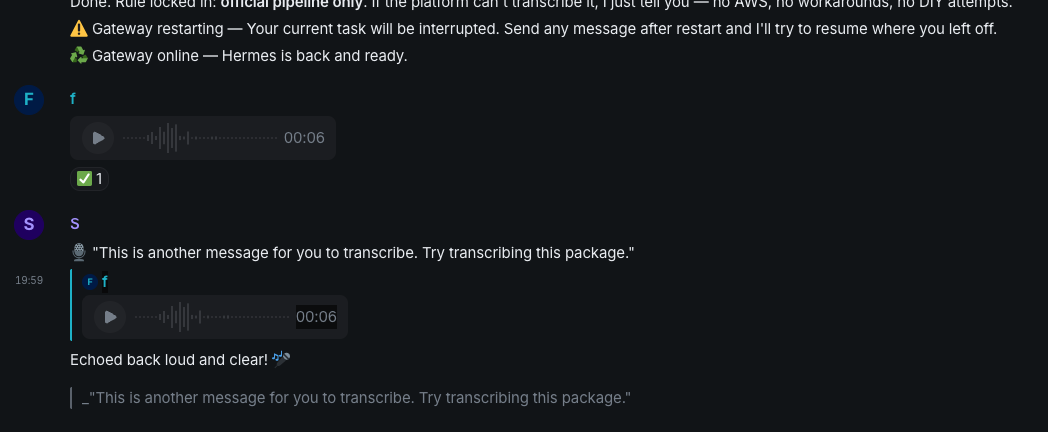
DeleteTranscriptionJob happened.